
Introduction
Hello everyone and welcome to the Tech Report for March 2022. The last couple months have been extremely busy for me, which is not typical for this time of year.
PowerSchool
Towards the end of February, Mr. Dupras resigned from HAST to pursue another career opportunity. I am thankful for his years of service to the HAST community and wish him the best of luck in his future endeavors. With that being said, we are actively looking for a new PowerSchool Administrator. In the meantime, we are collectively doing what we can to fill the void. I have been handling password resets for students, parents, and teachers. I have learned how to print off PowerSchool login information for parents to create parent accounts. I created the new year in PowerSchool so we can begin planning for next year. Mr. Wood inputted next years schedule into Power Scheduler so students can be placed into courses. The first day of Registration we realized students were not imported into the Registration system from PowerSchool. There is an issue with the automatic import that should take place. PowerSchool is aware and working on it. Mr. Wood and I figured out how to import students into the Registration system. While there are a couple errors, Mrs. Otero was able to go ahead and send out snap codes and High School Students are currently registering. Grades will be closed as normal for Quarter 3 and I will ensure report cards are sent out to students.
While there has been a lot of uncertainty the last couple weeks about how we will handle these issues, we are handling each as they come along and are persevering. There are many things still left to do, including getting the fees accurate in PowerSchool so the new payment system can be implemented. We are hoping to have someone in position soon who can begin to train and learn the job. In the meantime, please continue to be patient and understanding as none of us are trained in PowerSchool.
My School Bucks
The new payment system will be implemented soon. I say soon because we had planned for it to be implemented before now, but as mentioned above, there is a large amount of work in PowerSchool that needs to be done before the system can go live and we don’t have anyone to do that currently. When the new payment system is put into place, parents will be able to login and see all their fees and make payments through the powerschool parent website. They will also be able to purchase items from the store such as chargers, screen protectors, etc. The current technology store will no longer be used. This will also mean some changes for students and parents when it comes to broken iPads. When a student breaks an iPad and must pay the deductible, the fee will be assessed to them from inside powerschool. My School Bucks will then generate an invoice for parents. They can access the invoice through their My School Bucks account.
Any question regarding student fees or current balances should be directed to our Business Manager, Mrs. Czmiel.
Securly Parent
I have mentioned a few times we would be implementing Securly Parent to allow parents to partner with us on creating a safe Internet environment for kids. We had planned to roll this out for fourth quarter; however, with the departure of Mr. Dupras I have not had the opportunity to create the list and begin the implementation. My goal is to test this out with a few parents for the 4th quarter and see how it works so I may be of better help to parents in the fall when we fully implement Securly Parent.
Securly Parent will allow parents to receive custom reports for their children on at home Internet activity as well as school Internet activity. Additionally, if parents download the app, they will receive push notifications if there are instances of bullying, self harm, or violence. These push notifications would be followed by a phone call to parents from either Mr. Young or Dr. Egan. If neither Dr. Egan nor Mr. Young are available, Securly will notify the authorities to do a wellness check on the student. This is part of the Securly 24 program we already have in place; however, the app will give the parents the advantage of knowing what their children are doing before something like this happens.
Cybersecurity
We have continued our Cybersecurity program with infosec. A majority of staff have completed all videos and lessons…thank you! We are only as strong as our weakest link. I am noticing improvement on phishing simulations. In my conversations with staff I am also seeing a lot more caution when it comes to emails, attachments, etc. This is awesome!
Recently there have been some concerns about increased threats as a result of the ongoing conflict involving Russia and Ukraine. Ifosec put out the video below to address these concerns:
Maintenance Support Ticket Portal
This past week I created a new Support Ticket Portal for staff to make maintenance requests. This portal is very similar to the one I use for tech support tickets. You can find this Support Ticket Portal under the teacher tab on our website under teacher links. The password was sent in an email. Also in the support ticket portal you will see a link to a building request form. If you are having an event and need Mr. Funchion and Mr. Anderson to prepare the space to accommodate your needs, you would fill this form out.
Inventory & EOY Procedures
Since we are down to the final quarter of the school year, I will be looking at end of year procedures. This started with doing an inventory of all our Apple Devices. At the end of the school year, I will be looking at staff devices and staff tech in the classroom. I did this a few years ago prior to COVID. I will check your laptops, iPads, chargers, Apple TVs, Projectors, and your Sharp Boards to ensure they are functioning the way they should be. The goal is to avoid surprises prior to the start of the school year since the week before schools starts is always very hectic and busy. Please look out for an email regarding this in the next couple months.
Issues
2017 MacBook Pro Issue
A couple weeks ago I performed an update to all of our access points. Immediately after this update, two staff members using 2017 MacBook Pros began experiencing frequent dropping of service. This did not happen to staff running newer laptops. I tried the following: resetting the network settings, updating the computer, restarting all access points and switches, and changing some of the channel settings I thought could cause interference for the laptop. Nothing worked. The devices connect sometimes and then begin losing wifi frequently. I still suspect there is an interference issue or the laptops’ wifi cards do not like the access points. I did some research and found we are not the only ones to experience this issue on that specific model. It appears it is very vulnerable to interference. Both of these laptops will be replaced so the staff members do not have to continue to experience issues. I will continue to troubleshoot and see if I can find a solution to make these laptops usable again.
Updating iPads
To prepare for the upcoming iLearn test, I have asked teachers to ensure student iPads are updated to iOS 15, 15.1, or 15.2. iPadOS 15.3 and higher have not been made compatible with state testing as of this writing. Some students were unable to update their iPads. These students were all running iOS 14.8.1 and were not given an option to update to iOS 15.2. This is a known issue and will not affect testing as 14.8.1 meets testing requirements. The issue will be remedied once iPads are wiped at the end of the school year during iPad collection.
Gym Scoreboards
There was an issue in February with the gym scoreboards. Before a game someone had updated the computer that runs the scoreboards. The way the scoreboards are set up involves a tablet used as an extended display of a computer that manages the scoreboards. When the computer was updated, the drivers disappeared off the computer and could not communicate with the tablet. A call into watchfire resolved the issue.
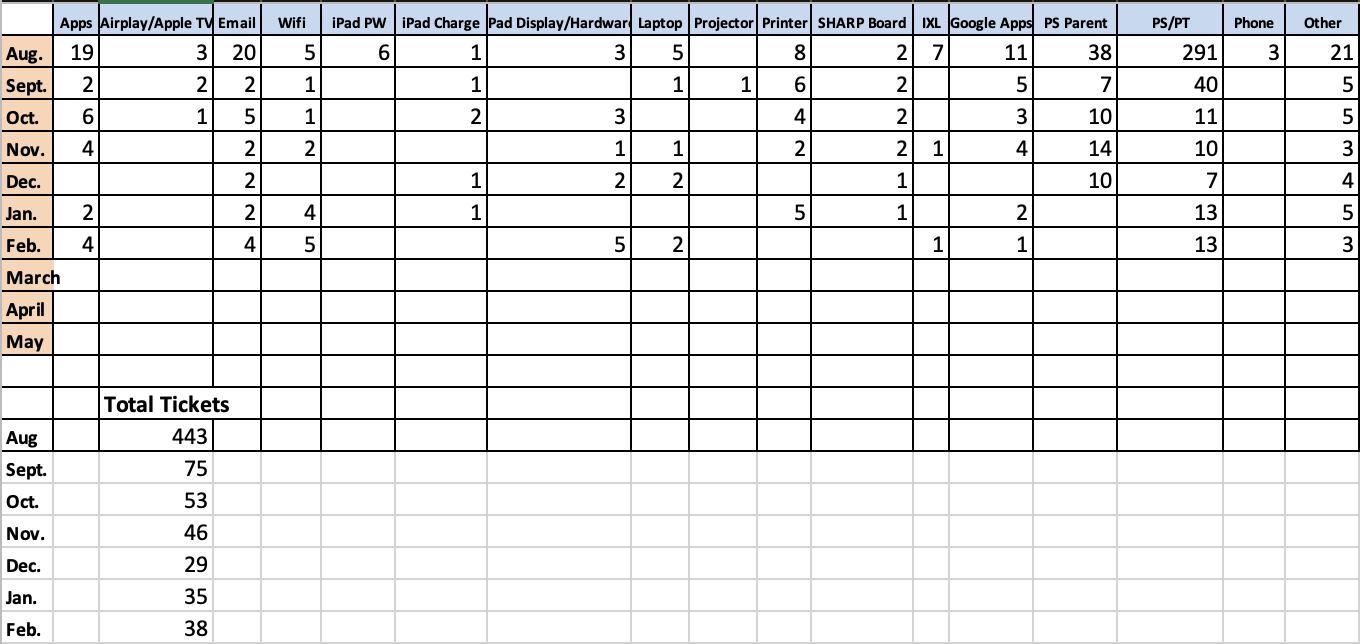
Support Ticket Breakdown
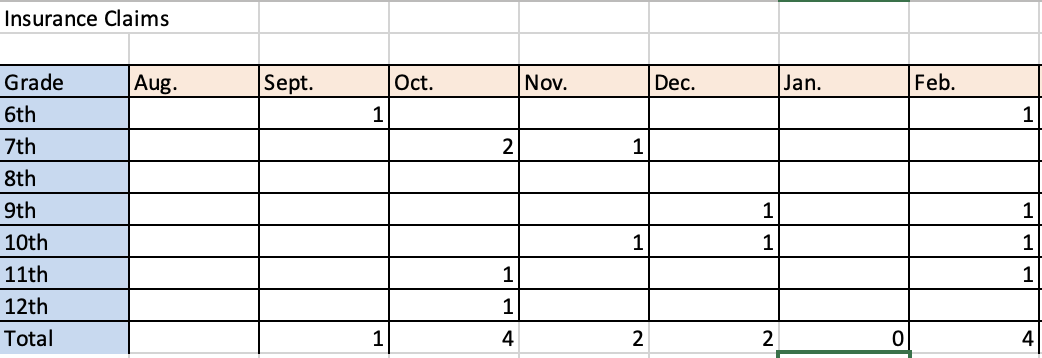
Broken iPads
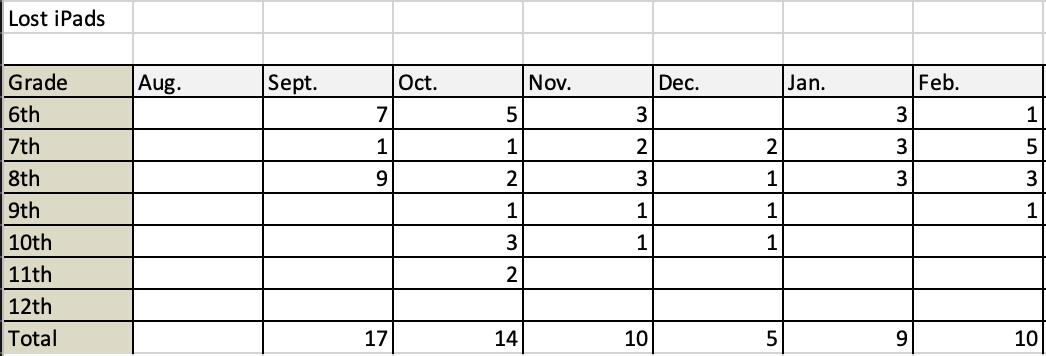
Lost iPads
Reminders
- Please remember to fill out support tickets for support issues.
- Take care of your devices.
- Please make sure your devices are charged and clear any background apps before testing.
- Visit HAST Tech Store for chargers, screen protectors, and to pay iPad deductible online.