
Introduction
Happy New Year and welcome to the first Tech Report for 2023! We are in our second week back to school after break and there are a number of topics and issues for me to address in this report.
Securly Parent Rollout
In November I rolled out Securly Parent and sent communication to parents with directions and information on how to download the Securly Home app and their accounts. With Securly Parent, parents will receive a weekly summary of their student(s) Internet activity on the iPad. If the parent downloads the Securly Home app, they will get push notifications whenever there is activity that indicates a student may be considering self-harm, harming others or involved in cyber-bullying. Parents also have the ability to pause the Internet and view a live summary of what their children are doing. So far out of 409 parent records, only 84 parents have activated their accounts and downloaded the app. I am seeing a much higher total of parents opening the weekly email summaries, however.
Phish Notify Now Rollout
For the last several years, anyone using Chrome had to install the phish notify extension in order to report phishing emails. In November this changed with the rollout of Phish Notify Now. Please see the directions below. All you will need to do is enter the license key. If you need the license key, please contact me.
Note: The very first time a learner submits an email they will need to accept the PhishNotify permissions. This will only need to be done once. See the Deployment section above for more information.
- PhishNotify for Gmail will show up in the Gmail side panel in the section below the default Google buttons.

If the side panel is not visible, users will need to click the arrow in the lower-right corner of the page to expand it.
- After clicking the PhishNotify button, learners will need to click the “Report Email” button to confirm the submission.

- Once the message is submitted, the learner will see the appropriate message for either a PhishSim or Non-PhishSim email per the configuration under PhishSim > PhishNotify > Edit Messages & Behavior.

Cybersecurity Issues in Schools
Over the past few months there have been a number of instances of school data breaches and cyber attacks. In Northwest Indiana there have been three instances in the last two months. In each and every case, hackers were able to use ransomware to lock sensitive files and prevent the school from accessing them without paying large amounts of money. These instances stress the importance of the Infosec Training I send out monthly as well as the phishing simulations. Staff need to be extremely vigilant in detecting scams and very cautious and suspicious when examining every email. In most cases, these attacks occur because one individual clicks on the wrong attachment or wrong link and puts everyone else at risk. This is why Cyebersecurity training is important and why you should care as well. When this happens, there is not only the financial loss, but there is also instructional time loss and sensitive data loss. It has also come to light the website “Teachers Pay Teachers” may have been responsible for several ransomware attacks in recent months, including some of the local ones. I have asked staff to avoid this website until they can set up a better verification system for the content they allow users to sell and share. Please keep up on your Infosec training as that is our best protection against these types of attacks.
Procedures
I addressed this in November’s tech report, but it is still a problem. I am seeing a large number of staff not following procedures when it comes to lost iPads, broken iPads, and support tickets. Please make my job easier by following the proper procedures and policies. I have these systems in place for efficiency. Students should not be sent to the main office for an issue. They should not be sent to my office. A support ticket should be filled out. All students have the support ticket portal as a quick link on their iPads. Staff can also fill out tickets for students. Insurance claims must be filed when iPads are broken. Paying for the iPad insurance does not mean they don’t have to be filled out. It means they have to pay a deductible and follow the procedure. See the tab above with policies and procedures and read through them. Some staff still don’t know what to do when an iPad is broken. There are many staff who do not know how to handle a lost iPad. The procedure is simple and everyone has access to the iPad inventory for this reason. Giving the name of the student and not their iPad number or serial number is not helpful to anyone, including me.
Internet Service Upgrade
In November we reviewed all the Internet Bids we received for next school year. Since school Internet is government subsidized through the E-rate program, we are required once contracts are up to receive and evaluate bids from companies willing to provide us service. We made the decision to stick with our current provider and will be increasing our total bandwidth to 3 Gbps, up from our current 700Mbps. This should provide a much more consistent speed throughout the building and should be enough to suit our needs for a long time. Currently our speeds fluctuate due to increased usage and a need for higher bandwidth.
Network Upgrades
In addition to the bandwidth upgrade, we will be completing some network upgrades to hopefully maximize the speeds we can reach throughout the building. The plan is to upgrade all 10 of our network switches with a model similar to our new core switch. These new switches are more powerful and have ports capable of 2.5 Gbps through RJ45 connection. I am also waiting on a quote to have the Cat6 cables between our patch panels and Access points upgraded to Cat6a, allowing for a higher speed and less interference. The goal is to get as close to that 2.5 Gbps max speed as possible. I will also be setting up a new Caching server or two to help with the speed of app downloads. The goal is for great improvements to be made. This fall we upgraded some of the connections and added the core switch, both of which have improved consistency and connection on the network. The new switches, cable runs, and caching server should be a major improvement for our network next year and make the Internet bandwidth upgrade even more noticeable.
Hammond Public Library Partnership
In November I met with staff from the Hammond Public Library about a partnership with HAST. Since then we have created this partnership and every student and teacher has received an education library card. Students who had previous fees with the library had them waived when their card was converted to a student one. There are no late fees with the student cards and the only fee associated would be for the loss of a book. There is a large catalog of digital resources available for use as well. The library does welcome field trips on site and has a very extensive historical document collection related to the city of Hammond, including a plat map from 1871. I hope teachers and students take advantage of this partnership!
Issues
Issue #1 – Phone System
The first day back after break it became apparent there was an issue with our phone system. All phones on the east side of the building were offline. All phones on the west side of the building were working as normal. After restarting the switch in our MDF closet, the east side of the building still did not come back up. I restarted the phone server and that did not fix the issue. I went upstairs to the IDF closet and found the fiber light was not lit up, meaning no connection between the two switches. Our phone server is in the IDF closet and directly connected to the switch for the west side of the building. So basically, the IDF switch was not communicating to the MDF switch causing it to not come online. I tried restarting that switch and it still did not work. I believed there was a problem with either the fiber line of that switch or the ports itself. Our phone company, MTA, came out and we troubleshooted the issue for several hours. We utilized different transceivers, different fiber patch cables, and even unplugged the switch and all the cables and tried plugging in directly to the MDF switch. All the tests revealed the ports had gone bad on the IDF switch. This was unfortunate as the switch was purchased merely two years ago. Luckily MTA had a switch available for temporary use. They configured and installed on the same day so our phones could come back online. We have ordered a new switch with a much better warranty and are awaiting its arrival.
Issue #2 – BYOD
Lately I have noticed many students bringing their own devices to school to use for school work. While none of them have gotten access to our main wifi network, this is still against our policies. Students SHOULD NOT be using their personal devices in the building for school work. Students should not be using their phones during the school day. The guest network is for guests, teacher phones, and students to use during lunch, before or after school. There are protections in place through the guest network, but again, the policy states students should not be using their own devices in school. I have seen students bring their own iPads and their own laptops to school. Please help enforce the rules and follow the policies.
Issue #3 – Big Office Printer & Staff Printers
The big printer in the main office was down for a couple weeks due to a paper jam. It has since been fixed by Pulse. There have been a number of maintenance issues this year with the staff printers as well. We have also noticed a much higher number of print jobs compared to the previous year. Additionally, staff are continuing to print in color, despite being told not to. You can print in black and white by modifying your settings. If you need help, please reach out and ask. The color prints are much more expensive and because the print jobs have increased so much, we have large overage fees. Next November our contract is up and I will be asking for printers that are more cost effective and only print in black and white for staff. Anything major needing to be printed should be sent to Gloria and done in the main office.
Issue #4 – FedEx Issue
In December I sent out several iPads and MacBooks to Apple for repair. I typically do this several times a year. Once iPads are sent out, Apple will send the replacements. After about a week, all devices were replaced or repaired and returned, except for one iPad Pro. Apple claimed to have not received that particular device. I contacted Apple and they said there was no movement from FedEx on the box. They advised I call FedEx and talk to them. I called FedEx and dealt with a very rude individual regarding the box. She told me I never sent the box out and there was nothing she could do about it. I informed her this was unacceptable as the device was dropped off with several others and all were returned except for this one. Again she claimed that could not be the case because they would have tracking on the box. I asked her if it were possible the box was lost in transit or at the warehouse. She told me that was unlikely and asked if there was anything else she could help me with. I told her I would like to file a claim for the lost device. She told me to go to FedEx.com and to follow the prompt and then hung up. I went on the website and filed a claim with all the information I had. FedEx denied my claim within 12 hours without contacting me, stating I needed to contact Apple’s corporate office to file the claim. I contacted Apple and they told me that was not the case and advised me to file another claim. We figured this would end up as a loss for HAST. Two weeks later a box arrived with a replacement iPad Pro and a receipt for the repair. I never received an explanation, so I can only guess FedEx found the package and finally delivered it to Apple. Thankfully the very frustrating situation was resolved.
Issue #5 – PowerSchool App Sync Issue
Another issue that arose last month involved the PowerSchool App. At the beginning of December, the PowerSchool app stopped syncing and gave students and parents an error message upon login. To fix the issue, I deleted the app from student devices and sent it back out. When the app wouldn’t download to student devices, I realized there was a bigger issue going on. After looking around a bit, I discovered Apple had changed the link to the PowerSchool app in the app store. This minor change prevent the app from communicating with PowerSchool servers and with downloading to student devices after deleted. I deleted the app completely out of our Mobile Device Management Server and put it back in with the updated link. When I sent back out to students, it downloaded successfully. Additionally, I placed a quick link icon on all student iPads with the PowerSchool website. Anyone with issues can access PowerSchool through the website.
Issue #6 – Devices Not Checking In
I am keeping an eye on an issue I have seen off and on over the last few months. Some iPads are randomly not checking in with our Mobile Device Management Server. This happens when the iPad is at low battery consistently for a long time and placed in battery save mode. It can also happen if the iPad is off and not being used. It can happen if the student is in airplane mode indefinitely. I am looking at the list often and checking in with these students who pop up to see what is going on. In most cases, after charging the iPad and getting out of power save mode, the iPad will check in. This issue has been more prominent with later iPadOS 15 releases.
Support Ticket Breakdown
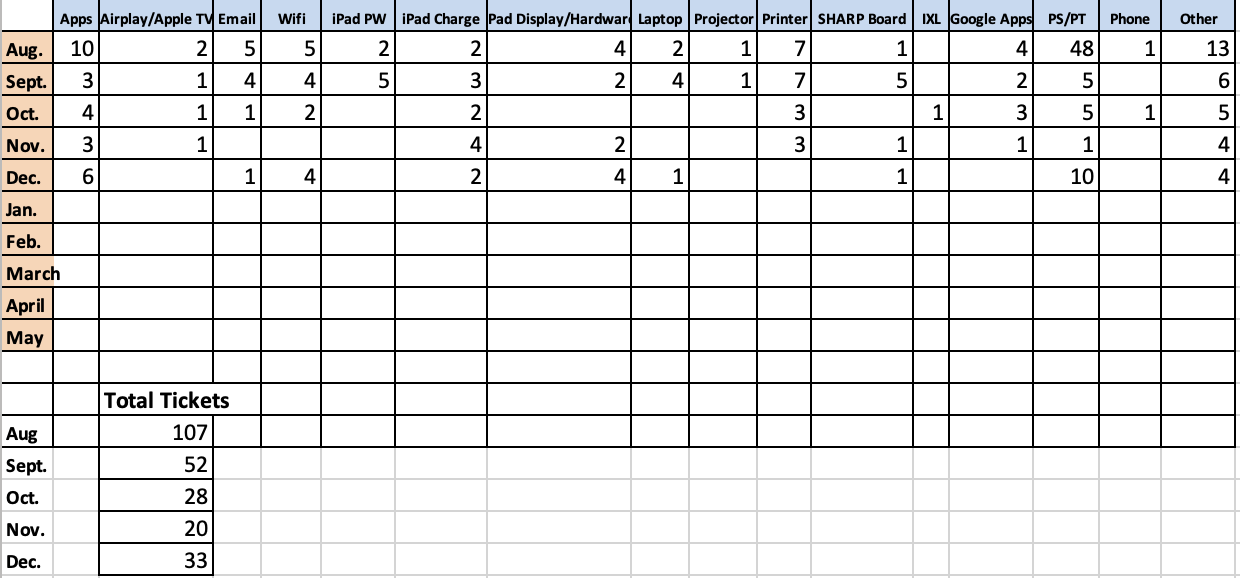
Support tickets continued to decline in November with a slight uptick in December. December had a lot more PowerSchool issues due to the PowerSchool syncing issue as well as students needing to get into their accounts to view their grades before finals. Nothing else really sticks out.
Lost iPads
Broken iPads
Reminders
- Please remember to fill out support tickets for support issues.
- Take care of your devices.
- Please make sure your devices are charged with the correct charging block.
- Visit My School Bucks store for chargers, screen protectors, and to pay iPad deductible online <==accessible through the PowerSchool Parent Portal on the website, not the app