
Introduction
Welcome to the bi-monthly Tech Report for March. In this report I will cover the issues of the last couple months and provide any important information needed.
Issues
Issue 1 – Intermittent WiFi Problem(s)
At the end of January the 8th grade Pod experienced a weird wifi issue. A teacher laptop was unable to connect to the wifi. Her laptop was presenting with a 169 address, the standard one given out by Access Points when they cannot pass down an IP address from the DHCP server. The issue spread to the other teachers shortly thereafter. Multiple restarts on the Access Points did nothing. Upon inspecting the switch in our upstairs IT closet, we found it to have frozen. A restart resolved the issue.
A week later, Dr. Rademacher’s Access Point was not giving out correct IP addresses. I decided the best course of action was to restart the switches in the morning. I restarted all the switches simultaneously.
Within a couple hours, devices in PLTW could not connect to the wifi. They were receiving the same IP address as the 8th grade POD. Due to the way the PLTW room is set up in the middle of the building, half the ports go to our downstairs IT closet and half go to the upstairs. I moved the Access Point from a port connected upstairs to one connected downstairs. Everything returned to normal and began working again.
The same day, a few devices began having issues in the Support Services wing. They were also receiving the 169 IP address. I switched ports for the Access Point and moved it to the entrance to the hallway. The issue was resolved for all, but one device. I worked the rest of the week trying different ways and researching different ways to get this device to keep its connection. No other issues were reported.
That Thursday night, I decided to take a deeper dive into our switch and access point setup. I found our new outside Access Points were running WiFi6 (802.11 AX) versus the WiFi5 (802.11 AC) of our other access points. I thought, though a longshot, perhaps there was some sort of interference causing issues with this specific device. I changed the outside Access Points to run 802.11 AC instead of AX to see if that made a difference. I also updated the firmware on each access point. Then I restarted each switch, one at a time from our fiber connection to the last switch.
We had no issues for about a month until last week when one 8th grade Teacher had an issue again. A quick restart of switches solved the problem. With so few people in the building regularly, it’s very hard to troubleshoot these issues. I have a network engineer assisting with this intermittent problem and am tracking and troubleshooting each device with an issue through our Network Management portal. Hopefully we can figure out the cause soon and find a permanent solution. For now, the issue remains a mystery…
Issue 2 – Google Searches Blocked on iPad
At the beginning of March it was brought to my attention there may be a hole in our web filter allowing students to search inappropriate images through google image search. Upon verifying this issue, I decided to use our old on premise web filter as a proxy for all google searches done on an iPad. This would allow us to control the content of searches and prevent students from using google image search to find inappropriate content.
In the process, this caused an issue where students were blocked from doing all google searches. The reasoning for this is because the proxy server is set to filter iOS and Chrome OS devices. iPads now run iPad OS instead of iOS, despite the similarities. The solution was to make sure iPads requested mobile sites and not the desktop version. See below for the fix:
RESOLVED KNOWN ISSUE – Google Searches Denied on Safari (iOS 14)
Updated 3/3/21
Issue:
Student iPads unable to conduct Google Searches as Google appears to be blocked on Safari.
Solution:1. Go to your Settings2. Select Safari from the left side3. Scroll down until you see the option for “Request Desktop Site”
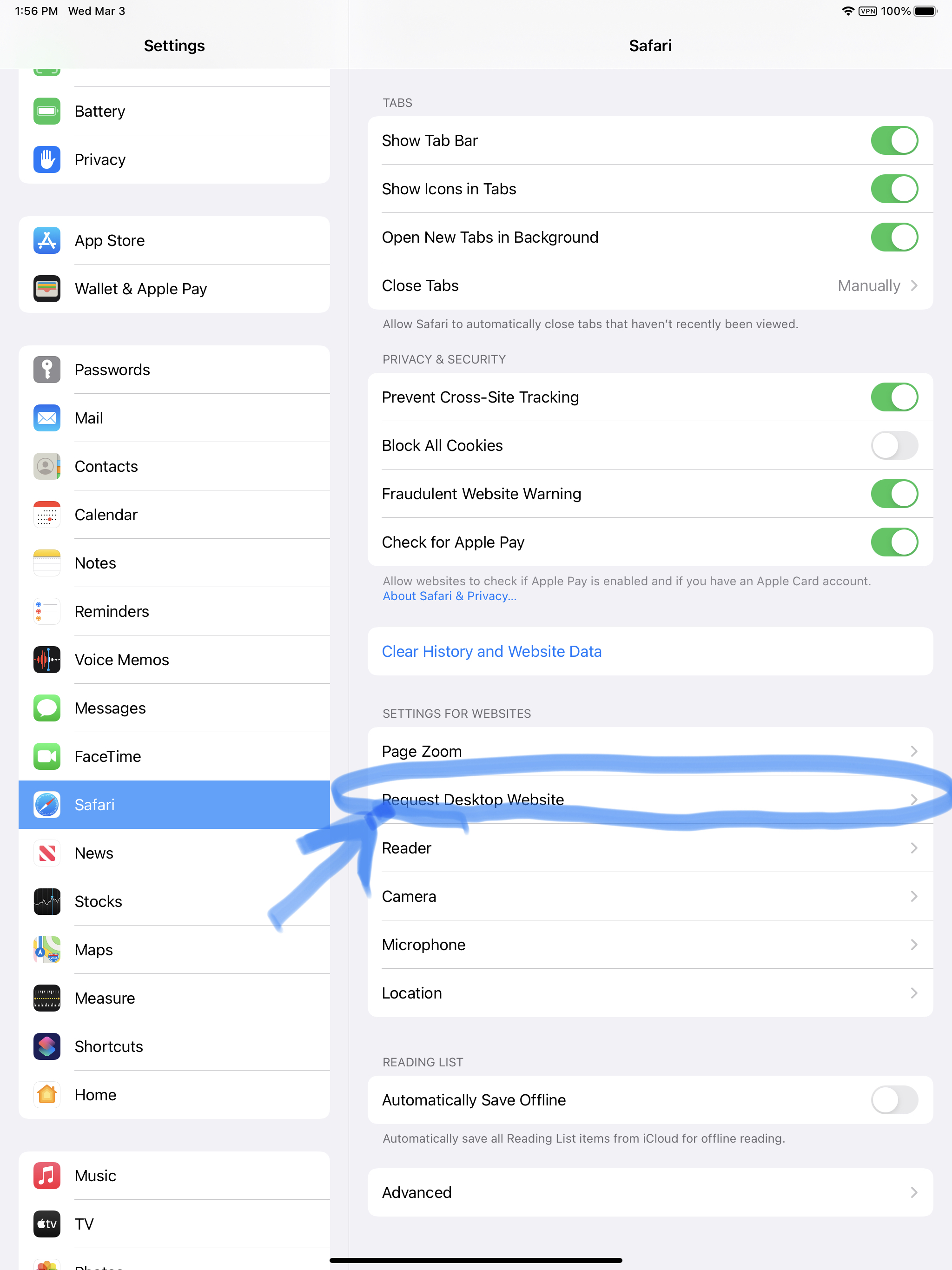
4. Make sure this option is not selected
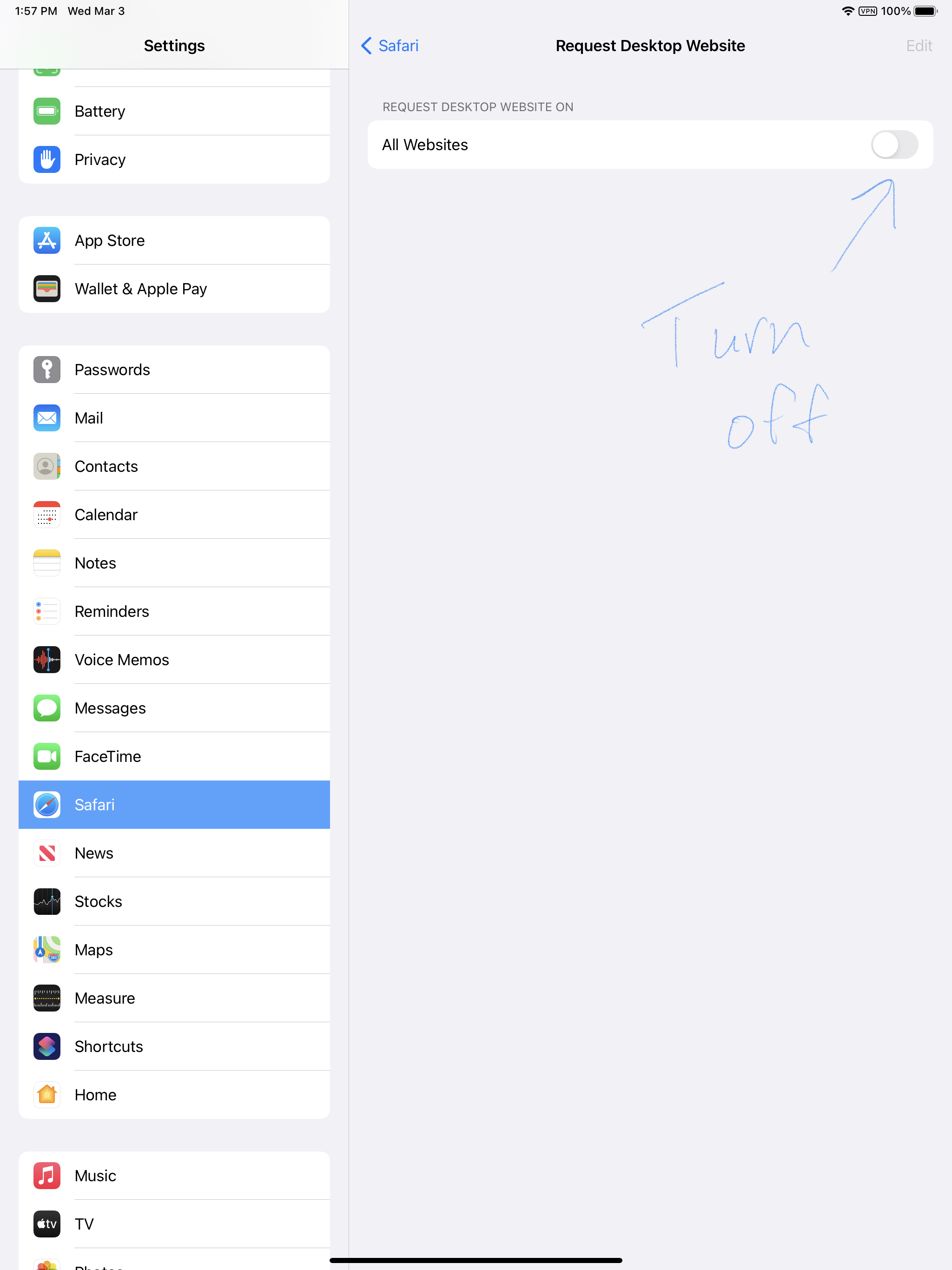
The issue should be resolved after unselecting Request Desktop Site
Issue 3 – Google Classroom PDF Editor Not Working
KNOWN ISSUE – GOOGLE CLASSROOM PDF EDITOR
ISSUE: When students go to use the PDF editor on an assignment (by pressing the pencil in upper right hand corner), they are taken to a black screen where they can write, but are not able to see what they are writing over.
DETAILS: This issue started after an update on Thursday, March 4. This is not related to the web filter or relay in any way. Both have been tested and ruled out. Older versions of the app are still working. Google is aware of the problem with their update and hopefully will have a fix soon.
The issue was fixed with a Google Classroom Update on 3/20/21.
InfoSec Training
As part of my mission to strengthen the cybersecurity at HAST, we purchased a program from Infosec to provide ongoing training and simulations to teachers. The program began in February with lessons on phishing and will contain ongoing phishing simulations and different types of scam emails attempting to trick teachers into clicking on bogus links or entering information into bogus websites. The goal of the program is to enhance staff awareness of these different threats and create a strong line of defense against those wishing to infiltrate our schools network. Most infiltrations that take place in organizations are the result of one individual making a mistake. Trained staff make all the difference.
Reporting Phishing Emails (Staff)
As part of the Infosec program, I have also asked staff to install something called “phish notify” to report all spam and suspected scam/phishing emails. I sent directions to staff on how to install and a follow up video for those who had trouble installing. The extension only works on Google Chrome, but most staff should be using that anyways.
Please remember to utilize this extension and NOT to use the google spam report button. When you report a phishing simulation using the google button, it will mark you down as having been phished. If you need individual help with installing the extension, please let me know.
New Tech Purchases
After going through the budget for next year and seeing what is available with regards to grant money, it appears we should be able to purchase new laptops and iPads for staff. This is good news and will keep up the trend of getting new devices every four years for staff.
Additionally, we will be looking at replacing all the old phones with new ones.
Support Ticket Breakdown
No support ticket breakdown this month. The portal was giving me problem with exporting tickets. There have been very little in regards to support tickets the last couple months. Most were related to the Google issues above.
Lost/Broken iPads
We did not have any iPads go missing the last couple months. We had one iPad broken during this time.
Reminder you MUST fill out the iPad insurance claim form for any and all broken iPads!
Reminders
- Please remember to fill out support tickets for support issues.
- Take care of your devices.
- Visit HAST Tech Store for chargers, screen protectors, and to pay iPad deductible online
