
Welcome to the latest HAST tech report for January, 2022. Over the last couple months there has not been much to report. There have been only a few issues and nothing major. As a result, this is my first report since October.
Issues
Bell System
Right after Thanksgiving we began to notice our bells were going off about a minute after they were supposed to. As time went on, the bell schedule shifted five minutes causing the bells to be useless. I restarted the system, the switches, and the problem was not resolved. Tri-Electronics, the company who installed the Bell System, came out right before Winter Break. The technician told me this happens when there is a power outage . While it is normal for the time to shift forward over time (10 seconds in a year), it shouldn’t have shifted the way it did. Only a power surge can explain that. He was able to move the time back told me to keep on eye on the time after winter break. If it moved forward again, then the controller would need to be replaced. Luckily, the time has not shifted since it was changed and the bells are working the way they should.
Students Unable to Browse Internet
From time to time I have had a student complain they can’t browse the internet. This happened at the start of the new semester to a few students and staff. Generally, this happens when the device has not been used for a while. The solution is to navigate to google and login.
For a couple students, this did not work. I noticed whenever they attempted to go to google, the certificate was blocked and stated it may be a fraudulent website. Upon further investigation, this may be the result of students trying to circumvent the Securly filter. On chromebooks, students can untrust the Securly certificate and it will allow them to browse the internet unfiltered. This does not work on an iPad. Instead, it breaks Internet browsing for the student.
The solution is to delete the Securly certificate off the iPad and reinstall it. Another note is I had one staff member with this issue on her laptop. The solution was to delete the Securly certificate and install it manually on the laptop.
Students Directed to YouTube Kids instead of YouTube
Another issue I have seen over the last few months has involved 6th grade students unable to go to YouTube. When the students navigate to YouTube, it instead takes them to YouTube Kids.
The issue seems to stem from a combination of Securly certificates and iPad Safari settings. To fix this issue, students will need to go to their Settings and then Safari. Make sure “Request Desktop Site” is turned on. Then they will need scroll to privacy and security settings under Safari and turn off Fraudulent Website Warning, block all cookies, and prevent cross-site tracking. Once this is done, the student will need to go to safari, log in to google using their HAST email, and then they can go to youtube as normal.
Printers
This year we have seen an increase in printer issues. This is most likely due to the age of the printers now as we have had them for a few years. Several units have had to have new rollers installed recently. Since this is due to usage, there is nothing that can be done to prevent it. Please report when these issues occur so we can get a tech out to fix them.
Coming Soon…
My School Bucks
In the next couple months we will be rolling out My School Bucks as an online payment program. This will sync with PowerSchool and allow us to collect payments online. It will also contain an online store. We are in the process of getting this set up.
Securly Parent Access
We are also in the process of setting up Securly Parent Access. This will allow parents to see what their children are doing on school owned devices and will also send alerts to them through the parent app with regard to emergencies such as self harm or bullying. Securly Parent will allow us to have a better partnership with parents in providing a safe Internet experience for our students.
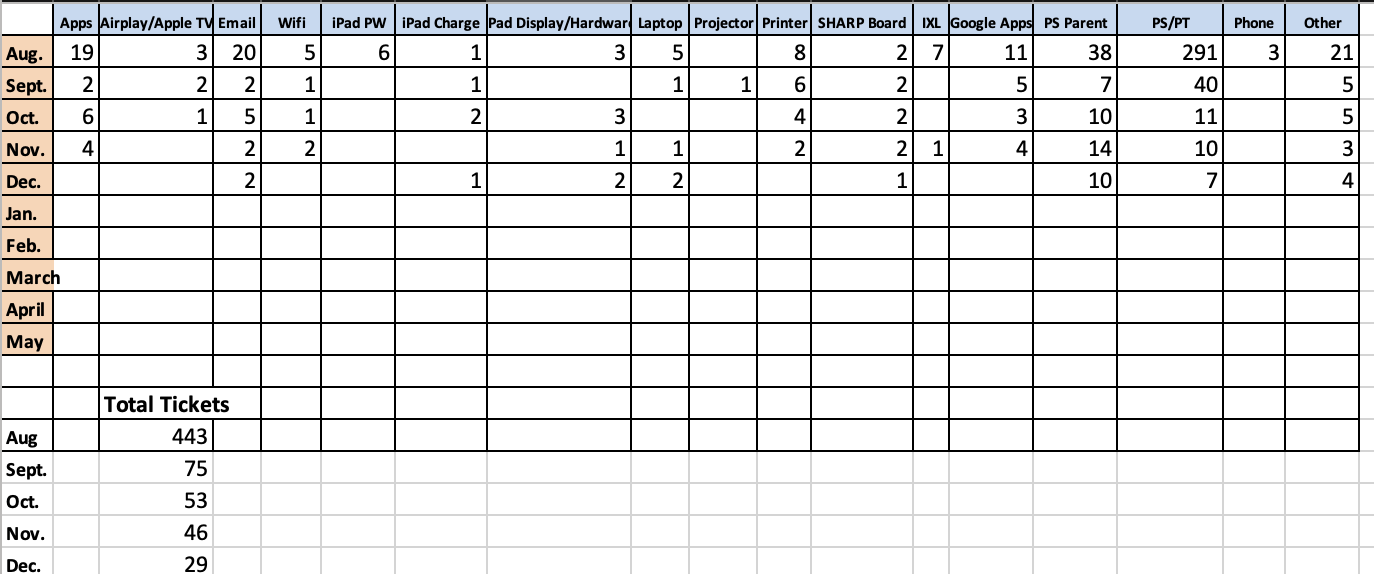
Support Ticket Breakdown
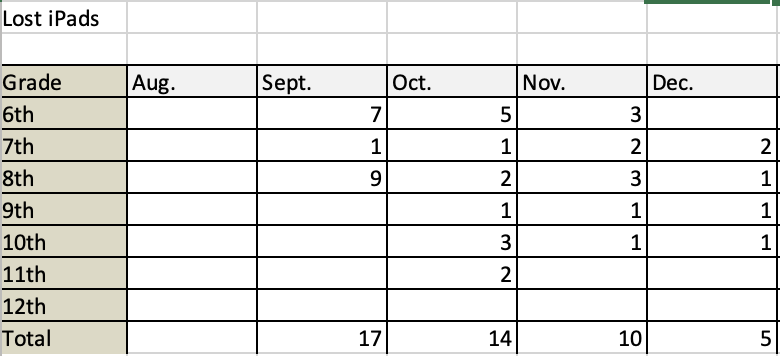
Lost iPads
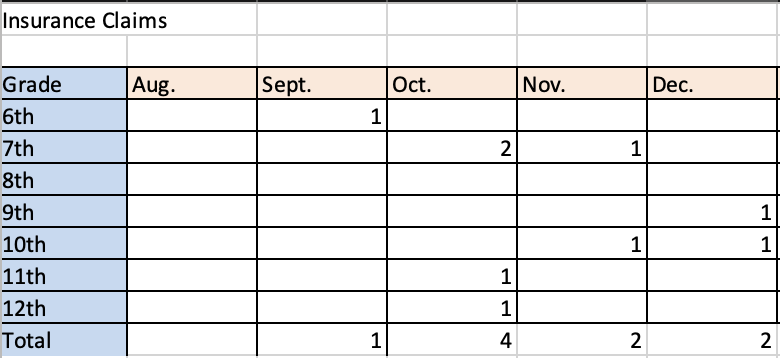
Insurance Claims
Reminders
- Please remember to fill out support tickets for support issues.
- Take care of your devices.
- Visit HAST Tech Store for chargers, screen protectors, and to pay iPad deductible online