
Introduction
Welcome to the second Tech Report for the 2024-2025 school year. I have a number of information to share with you this month including Student Data Privacy, updates to MacBooks, new staff Tech, and some reminders about processes.
Student Data Privacy
This year I have been working on our policies to ensure we are compliant with state and federal laws, as well as to complete a cybersecurity audit of our school. I am using the Center for Internet Security’s controls to complete this audit. One of the policies we did not address very well previously was related to Software Assets and how they are managed. I have always given staff freedoms to download and use what they deemed necessary in their classrooms. Unfortunately, this is a bad policy and could put us in violation of federal law if the educational tools used do not follow FERPA or COPPA and do not consider student data privacy.
A couple years ago I created a student data privacy policy for our parents and students that addresses some of these concerns. I have also created a Software Asset Management Policy for staff. I have included a brief summary of the key points of this policy below . I also am including our list of approved software. Staff will need to follow this list, but can make a request for additional software to be added by filling out the software request form included below as well.
All staff are required to do the ten minute long Student Data Privacy training in the Indiana Learning Lab and should also complete the hour long training from Common Sense Education, also located in the Indiana Learning Lab.
Finally, one of the more important parts of student data privacy involves Personally Identifiable Information or PII. Here are some thoughts on PII and why it is so important:
- PII (Personally Identifiable Information) Management:
- PII includes data like full name, SSN, email, phone number, etc.
- Legal frameworks like FOIA (Freedom of Information Act) and FERPA can make PII in emails and chats part of permanent records.
- Emails and chats can be subpoenaed and become public in litigation.
- Organizational policies might require retention of communications, including PII.
- Best Practices for Managing PII:
- Limit sharing of PII.
- Encrypt communications containing PII.
- Regular training on PII protection.
- Clear data retention and disposal policies. We follow Indiana retention laws. Our own policy has been to delete Google Chats every 90 days.
- Monitor access and distribution of PII-containing communications. This is important to protect HAST.
Student Data Privacy Policy <==On our website for Parents
Software Asset Management Policy
The HAST District Software Asset Management Policy outlines the governance of software assets within the district, focusing on compliance and security. This policy supports CIS Control 2: Inventory and Control of Software Assets, ensuring that unauthorized software is addressed and that only supported software is authorized for use. Key points include:
Purpose
- To manage the lifecycle of software assets, ensuring only authorized software is used.
- Maintain an up-to-date software inventory reflecting current software states.
Responsibility
- The IT department oversees all functions related to software asset management and informs users of their responsibilities.
Procurement
- Only IT or Administration can procure software, and it must be from approved vendors.
- IT must vet all software before purchase and installation.
Inventory and Installation
- Software installations must be recorded in the software inventory, including details such as title, developer, and acquisition date.
- Regular verification of the software inventory is required.
Usage and Discovery
- Refer to the Acceptable Use Policy for usage guidelines.
- Monthly reviews of installed software are necessary to identify unauthorized software.
Updates and Removal
- IT must approve all updates and upgrades.
- Decommissioned software must be removed from all district assets, and precautions must ensure data is not stored on external servers.
Exceptions
- Requests for policy exceptions must be documented with reasons, risks, and review dates.
Approved Software List
Software Request Form
Student Data Privacy Training
Please complete the student data privacy training from the Federal DOE, located in the Indiana Learning Lab. Please also complete the one hour Common Sense Education training. This training provides a much more detailed look at Student Data Privacy and you get one hour of pgp points at the end along with a certificate.
MacBook Updates
From the end of October into the first couple of weeks of November I have been pushing for staff to update their laptops. MacOS 15 has been available for a couple of months now, but I have discovered some issues since I have updated my laptop. These issues involve memory loss and a slowing down of my laptop just by running my web browser. I have not heard others experience this; however, I have advised staff to update their laptops to 14.7.1 if they are not running MacOS 15. Apple continues to support MacOS 14 and 14.7.1 is the most recent update with the most recent security updates. It is always good to wait a little bit before updating to a new MacOS just so the bugs can be worked out. As of November 13, nearly everyone has complied with my requests or has been updated remotely. There are a couple of you who have not and will be spoken to individually. These updates are important to ensure our laptops are secure and have the latest security updates. Mac has built in malware and virus protection that relies on these updates to do its job. Please help protect yourself as well as HAST by completing these updates when requested.
Issues
Issue #1: iPad Cases
In year two of utilizing the Logitech Rugged Combo 3 cases, I am seeing a lot more failures. It seems the case is not very durable when the keyboard is placed behind the iPad. This is not something that was told to us when we purchased the cases and not something advertised online when you look at the case. The failure occurs when the ribbon that connects the keyboard to the metal prongs inside the case breaks. There needs to be flexibility by design in the case, but this design makes it very sensitive to kinks and stretching.
To make matters worse, Logitech has had a hard time keeping these stocked and it took a month for 10 of these cases to be replaced by warranty. I have replaced a number in the last couple of weeks, but do not have enough to replace large numbers at a time.
Students should not bend their keyboard part of the case behind the iPad. When only using the iPad and not the keyboard, the keyboard should be laid out in front of the iPad.
Keyboard behind case = broken keyboard
Keyboard in front of case = working keyboard
Additionally, students should not grab the iPad by the keyboard flap. Gravity and the weight of the iPad will cause the ribbon to also rip or come out of place.
When we refresh iPads next year, I will look into other keyboard cases with a little more durability.
Issue #2 -Google Meet
During Virtual Learning day several middle school students were experiencing issues with Google Meet not letting them in. Despite the meeting going on, some students were receiving a message stating. “If you’re joining a meeting from Google Classroom, wait for your teacher to join and then try again.” Obviously this made little sense since the teacher and most other students were in the meetings. The reason this happened is because these students were not signed into their google accounts in google meet, despite being signed into Google Classroom. The solution was to log out of google in google meet and google classroom and then sign in on their browser, classroom, and meet. This worked for each student involved.
Issue #3 – Sharp Board Touch
Another issue seen again in October involved two sharp board losing their touch ability. We had a third board lose power to the screen completely, but this is not related and was a separate issue. The two boards who lost their touch ability were damaged by teachers moving them without powering down the computer and the board. This has consistently proven to damage the boards and cause the touch to go out. I have sent several emails over the last few years regarding this issue and advising staff not to move the boards without powering down. This can serve as a reminder to please follow this directive.
Indiana Learning Lab
The Indiana Learning Lab has a number of great resources available for staff to utilize to improve teaching. It is now possible to link your LVIS and Learning Lab Accounts to receive PGP points for each video and resource you access!
I have started to gather and create resources for staff that are only available to HAST. Please see the scribe below to learn how to filter the collections in Learning Lab so you can view the different collections we have. More will be added as time goes on, relating to various topics.
I have created a short 3 part video series on organizing Gmail. Most of you probably do not need this; however, some of you may benefit from this resource and you can earn PGP points for watching them.
There is a collection on linking LVIS to Learning Lab. There is a link to the ParentSquare teacher training and I will add more ParentSquare stuff in the future.
Finally, there is a collection on Student Data Privacy, as I mentioned above. I will be adding more materials as time goes on as will Ms. Kite.
ParentSquare
We are now well into the school year and ParentSquare is being utilized by most staff on a regular basis to communicate with parents. I did want to point out that ParentSquare groups should be used for all clubs, sport teams, and after school activities. ParentSquare provides a centralized platform that ensure all communications are delivered consistently. Using multiple platforms is not only annoying for parents, but can get confusing. Additionally, ParentSquare is designed for schools and adheres to all privacy laws. This cannot be guaranteed by other non-approved platforms. Additionally, we can control who has access to certain information and limited the potential for unauthorized data sharing that can occur on outside platforms.
To set up a group for your extra curricular activity, all you need to do is contact me and let me know what group I need to create and what staff members need access. Then you are given the ability to add students as needed to create your group.
This will allow parents and students to have one place to find all information for both academics and extra curricular activites.
New Staff Devices
In the Spring of 2025 we will be purchasing new laptops and iPads for staff. With the price differences between MacBook Airs and MacBook Pros set at $500, it is possible we will go with all MacBook Airs this round. We will see when the time comes. The process for replacing laptops will be very similar to the last time. For those who were not around last time, we will meet with each team and give you the box with a brand new laptop. You will be given directions on how to start the set up your laptop and then I will install your printer, Microsoft Office, and I will put an asset tag on your device. You will use your same username and password when setting up your laptop, to make things easier. I will then mark in my inventory. The process should not take very long. The iPad setup will be very similar. I would say this should take no more than a half hour. Your old laptop will be collected at this time, so it is important you have everything you need backed up to your Google Drive. I will give warning and set up appointment slots before we start this process.
Processes
I have noticed some confusion when it comes to certain processes and how things work in my department. I want to clarify some of these things below:
Broken iPads – When a student breaks an iPad, they fill out the insurance claim form and teacher collects the iPad. iPad needs to be given to me or placed in my mailbox. I notify parent of broken iPad and $50 deductible. Student should be accommodated with paper copies of work until deductible is paid. I DO NOT repair broken screens here. They get sent out to Apple as part of our Applecare Agreement. Students get a replacement within the hour after paying their deductible, unless I am not in the building or it is the very end of the day. It is a very quick process as long as payment is made. If a student says they have been waiting on me to get them a replacement, don’t assume they have paid. This often means they do not understand the process or that they need to make a deductible payment.
ParentSquare Updates – ParentSquare pulls its information directly from PowerSchool. If a parent needs information updated, it must be done through PowerSchool first before it can reach ParentSquare. This information should be updated by Mrs. Otero or Mr. Kman. If a parent needs an invite from ParentSquare, help with ParentSquare, that is where I can assist. Parents can update their information from their own profile within ParentSquare and we can see the requested changes there.
Support Ticket Breakdown

Lost or Stolen Devices
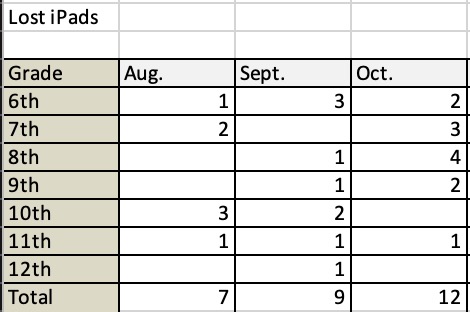
Students should not leave their iPad in a car for any extended period of time. This is not an acceptable place for an iPad to be left overnight. The temperature fluctuation the device would experience can actually damage the device. The iPad does not respond well to changes in temperatures. Whether it is winter or summer, do not do it!
Broken Devices

Reminders
- Follow procedures for lost iPads, broken iPads, and support tickets. I have had a number of staff email me instead of using the support ticket portal. I have directed all to the portal. Also, do not send students to my office. I am not always there and if I am in the middle of something, they will be sent right back and told to have you fill out a support ticket.
- Screen protectors, replacement chargers, and deductible payments can be purchased from the Technology store on our website. This is located under the quick links.
- All staff should stay up to date on their Infosec training.