

HAST uses ParentSquare for school communication, primarily with email, text and app notifications. ParentSquare automatically generates an account for each parent, using their preferred email address and phone number. We encourage parents to access their accounts so they can download the mobile app and update their preferences on when and how they are notified.
Here’s what you can do with ParentSquare:
- Receive messages from the school via email, text or app notification
- Choose to receive information as it comes or all at once with a daily digest at 6pm
- Communicate in your preferred language
- Comment on school postings to engage with your school community
- Direct message teachers, staff and other parents
- Participate in group messages
- Sign up for parent-teacher conferences
- Send payments, sign forms & permission slips, receive report cards, sign up to volunteer and more all from your desktop or mobile device
It is important to check your individual ParentSquare settings to select your preference for how you receive information. You can elect to receive messages instantly or you can choose to put them on a daily digest.
This ParentSquare tutorial will guide you through accessing and selecting your individual ParentSquare message settings.
ParentSquare Overview for Parents from ParentSquare on Vimeo.
Getting Started Guide (English)
( PDF )
• Getting Started Guide (Spanish)
( PDF )
• Account Registration Handout (English)
( PDF )
• Account Registration Handout (Spanish)
( PDF )
• Introduction to ParentSquare (English)
( Word | PDF )
• Introduction to ParentSquare (Spanish)
( Word | PDF )
• Tips for Parents & Guardians (English)
( Word | PDF )
• Tips for Parents & Guardians (Spanish)
( Word | PDF )
Parents can change the default language setting as well as customize post notifications based on type and delivery method.
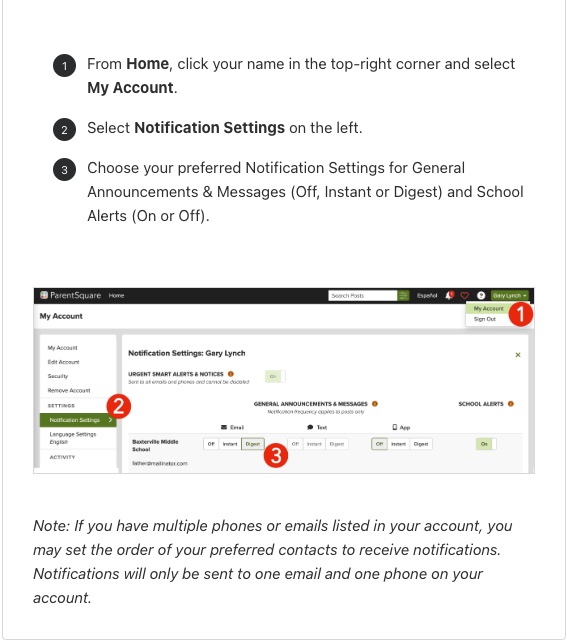
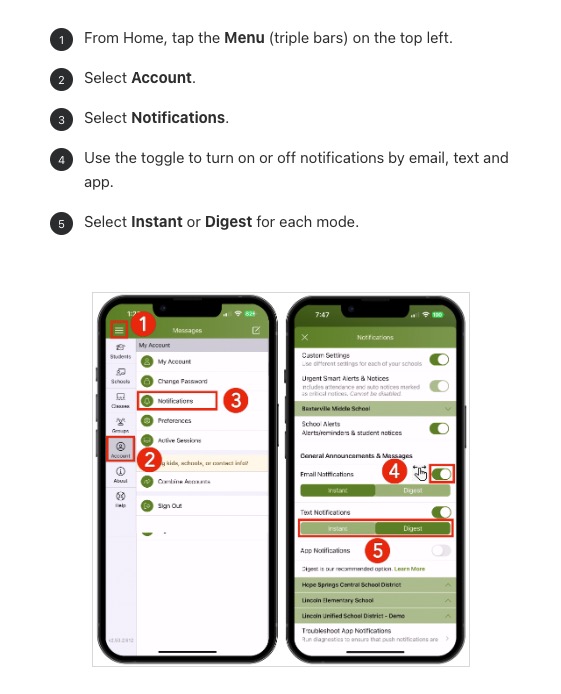
Change Your Notification Settings for Posts
You can customize your Post notifications based on type and delivery method.
- The Instant setting will send all Post notifications in real-time.
- The Digest setting will send all Posts for the day in one single digest at the end of the day (recommended.)
Posts sent as immediate, as well as direct Messages and Alerts, will still be delivered instantly. For more on notification settings or to watch a video, click here.
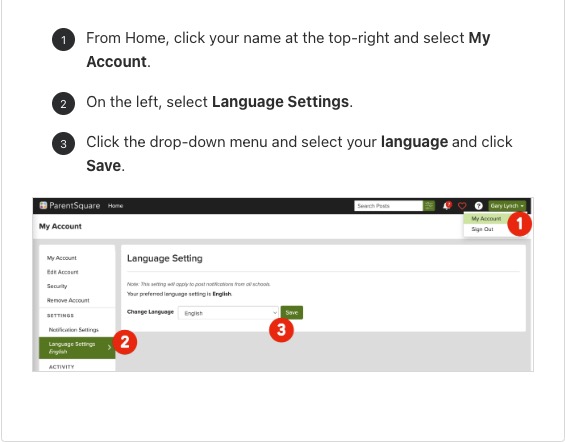
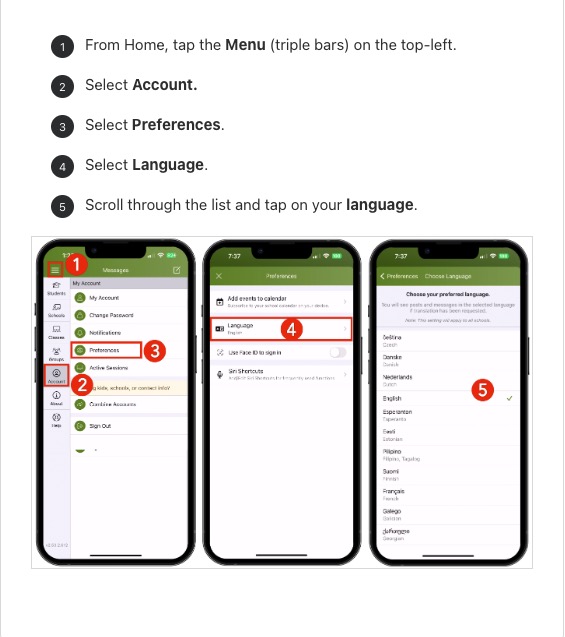
Change Your Language Setting
You can change your language setting so that you will receive Posts, Messages and Alerts in your own language.
For more information on Notifications, you can go to the “Manage Your Notification Settings” in ParentSquare. Click here for the Manage Your Notification Settings. To view this article, you will need to login to ParentSquare.