
Introduction
Welcome to the last tech report for the 2023-2024 school year. Normally I do these every other month, but this one is being done a little bit later. There is a lot of information I am sharing in this report. If you have any questions don’t hesitate to ask me.
Important Information
Tech Observations/Tech Survey
In March Ms. Kite and I conducted both a technology survey and tech observations. The purpose of both was to get a better understanding of how technology is used in the building so we may plan out professional development for next year. Thank you to all staff who coordinated times for us to get into your classrooms and observe. It was greatly appreciated.
These observations will not be included as a part of your evaluations, but they did give us some good insight. Using technology is more than just using a bunch of apps, it is how the technology is used to enhance student learning. We were looking for that pedagogical approach to technology usage. Some of you are familiar with SAMR, but most are not.

The SAMR Model helps to asses the level at which technology is used in the classroom. The lower stages of substitution and augmentation can include using a digital textbook instead of a physical textbook or digital version of worksheets or instructional videos. Modification and Redefinition allow learning to be transformed entirely by the use of technology. For example, lets say you are teaching World War II history and want students to write a paper about a specific topic on World War II. In the substitution phase, you would have student use a word processor to write their paper. In the Augmentation phase, students might use text to speech and spellcheck/grammar check to improve the process of writing the paper. In the modification phase, student uses Google Docs and shares with teacher and classmates who then make comments and provide feedback to the student while he or she is writing the paper. Student can then make changes based upon this feedback. In the Redefinition phase, students might make a video to communicate the same ideas that would have been expressed in the written assignment.
Teachers don’t always have to create content at the modification and redefinition stages, but they should focus on student centered and project based learning. Students should be creating and sharing. They should be problem solving and learning through inquiry. This is what HAST was built for. The goal of PD for next year will be to focus on project based learning and how to encourage students to think critically and to be creative in order to learn concepts.
ParentSquare
Starting next school year, we will begin using ParentSquare for school communications. This platform not only allows for the same communication with parents we currently have with School Messenger, but it also allows for two way communication between parents and staff. One of our goals as a school is always to enhance communication and ParentSquare will allow us to effectively and efficiently do this.
All important information can be shared with parents through ParentSquare and they can choose how they receive the information (email, text, or through the parentsquare app). They can select how often they receive communication (as it arrives or end of day/end of week summaries). Through the parentsquare website, parents can select their preferred language as well for all communication and it will be translated into that language.
Emergency notifications will go through parentsquare, attendance notifications, report cards, fee notifications, and newsletters. Sports teams, clubs, and other afterschool activities can be set up for communication groups as well.
Finally, we also purchased the phone call add on, allowing for teachers to utilize the parent square app to make phone calls to parents. A full transcript of all phone calls will be included with each phone call made. This add on will allow teachers to contact parents when we are not in the building on a virtual day or if it is an important phone call where a record is needed.
New Printers
As I indicated in the January Tech Report, we are replacing the Printers and copy machines with new ones. We were hoping this would take place in March before spring break, but it is looking more likely to take place the end of April or beginning of May. I have given team leaders one last black toner to hopefully get them through the next few weeks. Color is first come first serve. Once it’s gone, I will not order more. The new printers will be much more efficient and the toner should last longer. They are not made for color prints and teachers are discouraged from printing in color. There are exceptions, but please do not print 95 copies in color. Color toner is much more expensive than black toner. Color toner should be reserved for projects or prints of less than 20. Any large color jobs can be sent to Mrs. Valdez for printing on the big copier/printer.
The new machines will be set up specific to each pod, but will not contain a key code. Air print will work on them as well, allowing the capability of iPad printing. This should make printing much easier and avoid a lot of the error messages staff receive on different types of prints. There also should not be any specific instructions for printing (system dialog, etc.). If you have questions about the way these machines will work, you can ask Mrs. Lucito as Title 1 has been using an Epson Machine for the last 2-3 years and the machine works great.
Teacher OS Updates
In January and February I encouraged teachers to update their MacBooks to the latest MacOS. Mostly everyone updated with the exception of a few. Updates are important to maintaining the latest security on your MacBooks. As of this writing, the most recent Mac OS update is 14.4.1. Please ensure you are keeping your laptop up to date. When the next big Mac OS version comes out, I always recommend waiting a few months before upgrading; however, security updates will continue on the previous version for some time and should be installed.
Issues
Issue #1 – Google Classroom
In February and part of March there was an issue with Google Classroom where teachers were intermittently unable to upload assignments from drive or from their laptops. The issue seemed to only affect Chrome browser at first, but then it started to impact Safari users as well. This coincided with two updates from Google, one for classroom and one for Chrome. After finding several workarounds that seemed to work, more and more users became impacted and the workarounds stopped working. I reached out to Google and spent quite a bit of time trying different things per their recommendation before they told me to reach out to Securly stating it was a problem with Securly several other organizations were having after the most recent updates. I contacted Securly and within an hour the issue was fixed. This was not an issue with HAST specifically, but rather one that impacted all Securly users who also use Google Classroom.
Issue #2 – Data Exchange
At the end of January and early February there was an update to Data Exchange and all users were removed from data exchange. This issue affected all PowerSchool issues in Indiana. After our PowerSchool was updated to accommodate the Data Exchange issue, a few tweaks in PowerSchool allowed all data to appear again.
Issue #3 – Gym Access Point
In order to ensure Ms. Nimon is able to do the ordering she needs to do and complete all necessary tasks relating to her job, I turned up the signal on the gym center access point. The kitchen itself gets a very poor signal, so it took a couple weeks of making changes in order to find a combination of settings that work. The signal is much stronger now and so far has shown little signs of interfering with the 8th grade classes.
Issue #4 – Printers
The usual printer issues with rollers not working continued in January, February, and March. Each time Pulse was contacted and came out to fix the issues.
End of Year Stuff
Testing
The end of the year brings SAT, iLearn, and NWEA testing. SAT was completed in March and went smoothly. iLearn will start the middle of April. A couple of things are important to remember from a tech standpoint:
- Students should close out all apps on their iPad before testing.
- Students should restart their iPads before testing
Those two things help to prevent 90% of the issues that would arise during testing.
During iLearn testing, I will be situated in the front outside of PLTW. Stephanie will also be available to assist with any technical issues that arise.
A week or so after iLearn is over, we have our Spring NWEA testing. Talk to your team leaders about the schedule for this. I will create the tests for grade levels as usual. Same advice applies as above to avoid issues. You can use my NWEA guide for any and all technical questions.
iPad Collection
Once testing is complete, iPad collection will begin. I will send out detailed instructions as well as arrange dates with teams for the collection of iPads. Just as we did last year and have done most years, iPads will be collected before finals. Stephanie will lead an afterschool training on using zip grade to make grading paper based finals easier for teachers. Ideally, middle school iPad collection will coincide with their final NWEA tests.
PD May 29th
Our final PD for digital learning grant we received will take place on Wednesday, May 29th. This PD will be on Google Classroom. We will be streamlining our Google Classrooms at HAST so they have the same basic format as well as requirements. This will help to organize teachers and make it easier for students/parents to know where to find things within Google Classroom. There should be a stipend for all who attend this training.
Room Changes/Phones/AP Changes
There are a number of teachers changing rooms after this school year. I will be working with you to ensure your phone is changed over to your name, as well as your SHARP board if you prefer to keep the same board. Please do not move your phones from your old room to your new room. I will change the phones from the server. The physical phones will remain unless there is a problem. If you wish to move the phone from a specific location in your room, you will need to fill out a support ticket and let me know what port the phone is currently plugged into and what port you will be moving it to. This is VERY important. I will reach out to the individual teachers moving in May to go over what I need from them. Additionally, the names of access points will need to change to accommodate the room changes. I will do this when the building is not being used so as not to interrupt service during summer school.
12th Grade Email Accounts
Usually the 12th grade Email accounts are suspended and archived the first week of July; however, this year they will be active all the way until the first day of school. The 12th grade mailing group will not work after rollover, however. The parent groups will also be updated and student groups will be updated after rollover. I will send notice to staff as usual.
Preparing iPads and iPad Rollout for Next School Year
Now that we are in April, I will begin preparing new 6th grade iPads for next school year. Next years 6th graders will receive brand new iPads we did not use this year along with some iPads from graduating students. iPads will be unboxed, asset tag placed on them, and placed in cases. If I have time, I will put screen protectors on them as well. Once summer hits I will work on creating any accounts that need to be created for students. The 6th grade will login to iPads differently than we have in the past. This ONLY affects 6th grade. The iPad username and password when enrolling will be the full HAST email. If this works out well, then I will continue this until we no longer need network accounts and can use Google Accounts for everything.
Any new student entering other grade levels will be prepared in the same way, except I will use network accounts for enrolling those iPads.
Per the request of high school teachers, iPads will be rolled out prior to school starting. Teachers in each grade level will be responsible for turning on and enrolling each iPad so it may configure and be ready for students. Teachers will then allow high school students to come pick up their iPads prior to school starting. Details will have to be discussed, but this should make it easier for teachers at the high school to start the school year.
Parent Square Rollout
As mentioned above, we will be rolling out ParentSquare this summer for staff and parents. I will send out some training for staff in May as well as information on how to login so you can complete the training. This will help prepare staff for using this program. There will be other training in the summer as well. The goal is to roll this out for staff in June and parents in July.
Support Ticket Breakdown

Lost iPads

Broken iPads
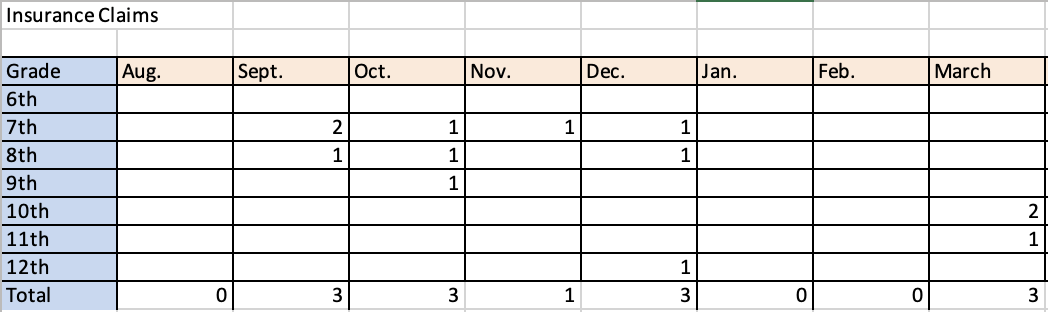
Reminders
- Follow procedures for lost iPads, broken iPads, and support tickets. I have had a number of staff email me instead of using the support ticket portal. I have directed all to the portal. Also, do not send students to my office. I am not always there and if I am in the middle of something, they will be sent right back and told to have you fill out a support ticket.
- Screen protectors, replacement chargers, and deductible payments can be purchased from the Technology store on our website. This is located under the quick links.
- All staff should stay up to date on their Infosec training.