
Introduction
Welcome to the March Tech Report for 2023. We are entering the home stretch of the school year with spring testing, spring break, and the final quarter of the school year. As in past years, the time flies and before we know it summer will be here. This will be the last tech report for this school year, so I will include as much information about tech related items coming up in the next few months.
Spring Testing
Spring Testing began on March 1 with SAT testing for 11th grade students. This testing is very important as student performance on the SAT is now part of how we are evaluated as a school. Last year was the first year the testing took place electronically. There were a number of issues with students getting disconnected from the test. This was a statewide issue, but very frustrating and disappointing for both students and staff proctoring the test. This time I was very nervous we would experience similar issues. Thankfully all went smoothly without a single issue. I made several changes to our network in the fall that I feel contributed to a much smoother experience as well.
On March 7 we began NWEA testing. Again, testing went very smoothly after a rough fall testing. There were very few if any issues. After NWEA is over, we will have iLearn testing and I am expecting the same smooth experience for all testers and proctors.
Wrapping Up This Years Infosec Training
As we head towards the end of March, there are only 2 more Infosec Cybersecurity Trainings left this year. We have completed two phishing simulations this year with huge improvement from fall to spring. The phish rate went down from 43% to 11%. Most staff completed their trainings in a timely manner and I have consistently sent reminders to anyone who hadn’t completed the training. In today’s world hackers get into systems mostly through social engineering schemes, and it is important for everyone to be trained and competent in order to protect ourselves and our school. Lets finish our trainings and end the year on a positive note!
Printing Guidelines
I sent out the below information to staff after it was revealed we had large overages for print jobs, especially color prints. There has been a lot more printing going on than in previous years.
- Color prints are much more expensive and should be reserved for very small jobs (no class sets).
- Large print jobs (50 or more copies) can be taken to Mrs. Valdez, especially if color is needed. Please give at least 24 hours notice to Mrs. Valdez of any print jobs needed!
- Staff should change their default Kyocera settings to black and white – see video below for instructions.
- Ask yourself if there is a digital way to give the information you are printing for students. Do you utilize Showbie? Trust me, I understand wanting to do more pencil and paper after the last couple years, but we also shouldn’t be using four times the amount we did before covid. We are still supposed to be a tech school.
- If you have an issue with your printer, fill out a support ticket. If I cannot fix it, I will call Pulse support to come out and service the machines.
- If you ever find you do not have enough of a specific toner, please let Mrs. Valdez know as she may have it in stock or can order it quickly.
- Donations of paper to the office when asking for large print jobs are always welcome.
Please review the video below and change your settings ASAP. We will be monitoring the print jobs much more closely to see who is printing in color.
https://drive.google.com/file/d/1vgAcbLFvfQytFuJsCFEPQDeiKqsdOhag/view?usp=sharing
Projector Filters
The last week of February I went to each classroom and cleaned out the filters on their projectors. This is something I usually did every year, usually twice a year, before COVID. Without an assistant, I have not had time to make the rounds as I normally do. I will start putting this into maintenance schedule and ensure I get this done at least once a year, but hopefully twice. The filters were pretty dirty for the most part and this simple maintenance will extend the life of the projectors.
Copper Phone Line Conversion
Currently we are in the process of converting our phone lines for alarms and fax machine from copper to digital. We started this process years ago, but it was never finished. Now that copper lines are being phased out, this is being reexamined. If you hear persistent beeping in the basement, it is because the lines are being tested. Currently we are waiting on a time when both the phone company and the alarm company are available to work together to make the switch.
PowerSchool Password Changes
Mr. Kman has informed staff of new changes that are happening this week to the way PowerSchool accounts (students, parents, and teachers) and passwords are handled. While we will not know exactly the extent of these changes until Thursday of this week, here is what we do know and what you can expect:
- Passwords will need to be updated to fit higher security constraints (ie. 8 characters or more). They also cannot be part of the top 1000 bad passwords https://github.com/danielmiessler/SecLists/blob/master/Passwords/Common-Credentials/10-million-password-list-top-10000.txtSecListsgithub.com
- Mr. Kman will no longer be able to mass assign passwords any longer and they cannot be exported to PowerSchool. So the document shared with teachers will become useless.
- Parents will need to have an updated email address in PowerSchool to reset their password.
- We are unsure if a temporary password will be sent to HAST email accounts.
Mr. Kman and I will be looking into single sign on using HAST email accounts in the near future. If you have any further questions, please contact Mr. Kman ([email protected]).
Tech Store Instructions
In the event you have a parent ask how to pay for chargers, screen protectors, or iPad deductibles, you can use these directions to show or walk parents through the process. This information is also available on the tab above under Online Forms.
The HAST Technology order form has been replaced with the HAST Technology store, available through My School Bucks.
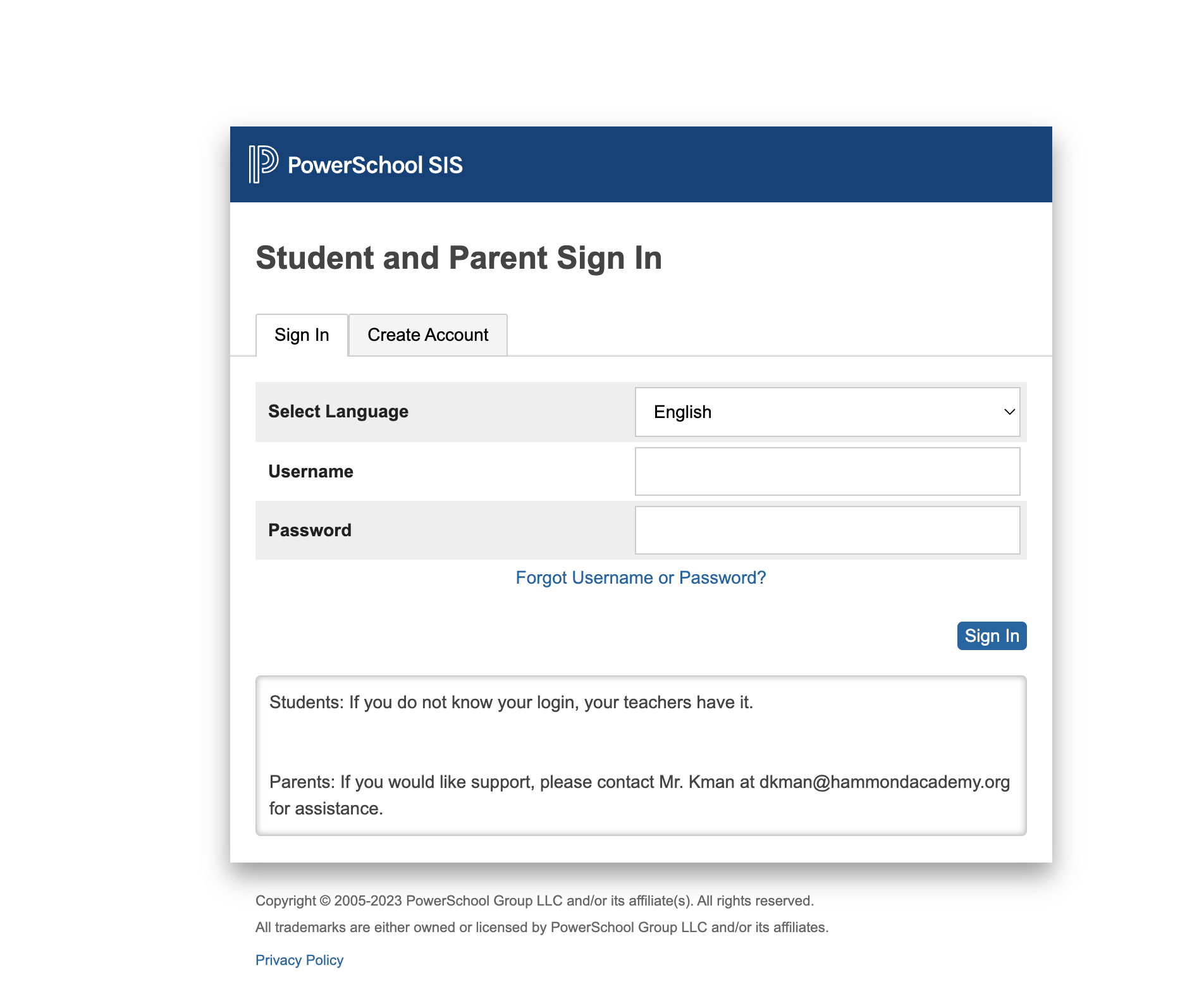
- To access the HAST Technology Store and purchase chargers, screen protectors or pay for iPad Deductibles, log into your parent PowerSchool account on your browser (NOT THE APP): https://hast.powerschool.com/public/
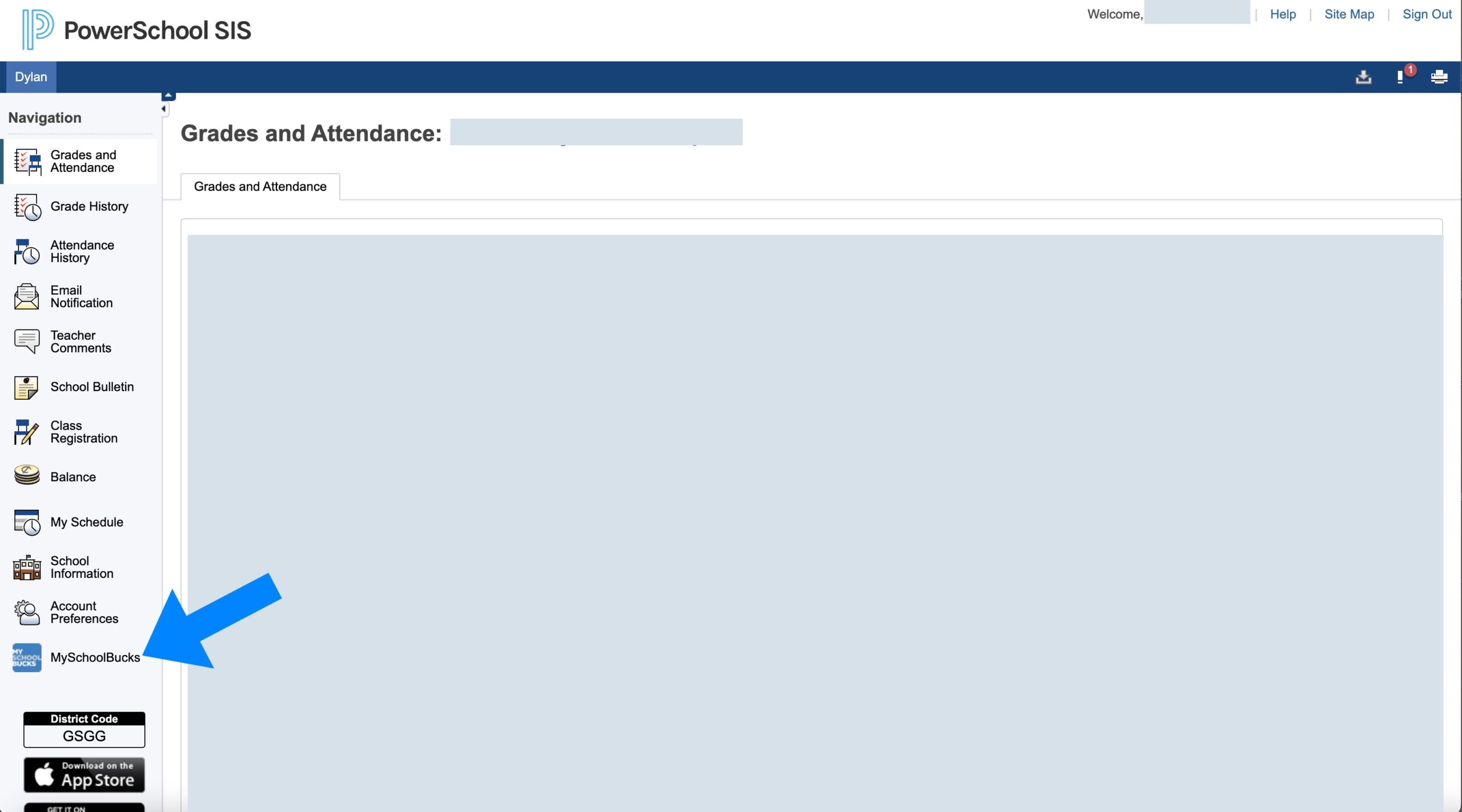
2. Once logged in, scroll to the bottom, left hand side, click on MySchoolBucks
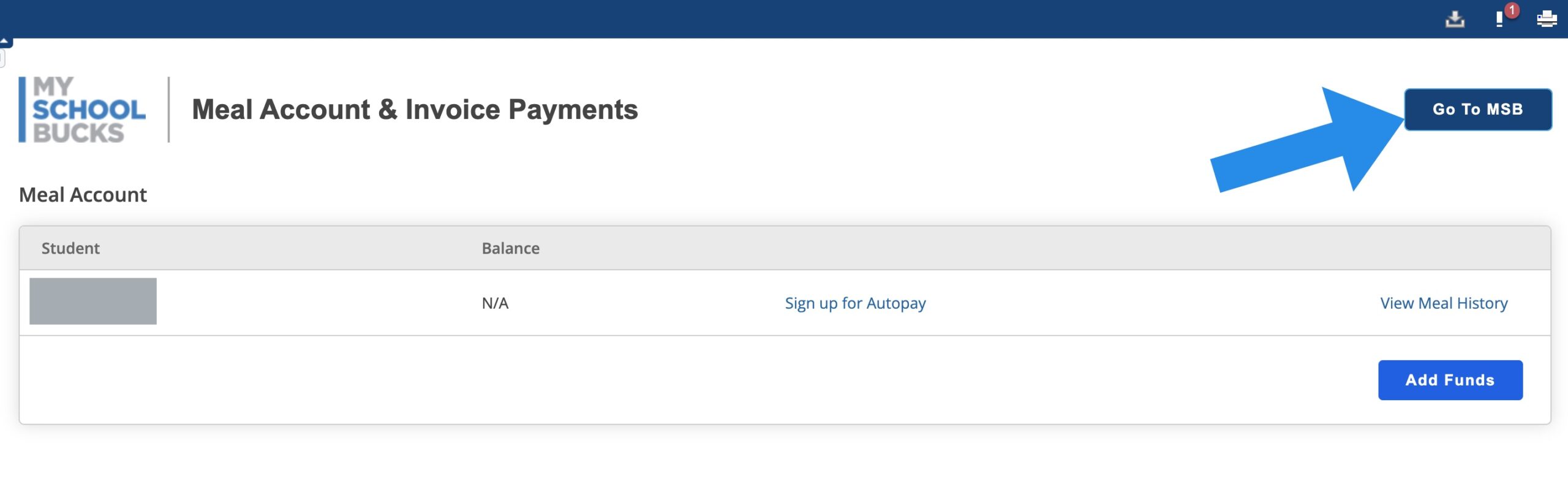
3. You may need to select “Getting Started” in order to have access to the My School Bucks site.
4. Click Go To MSB.
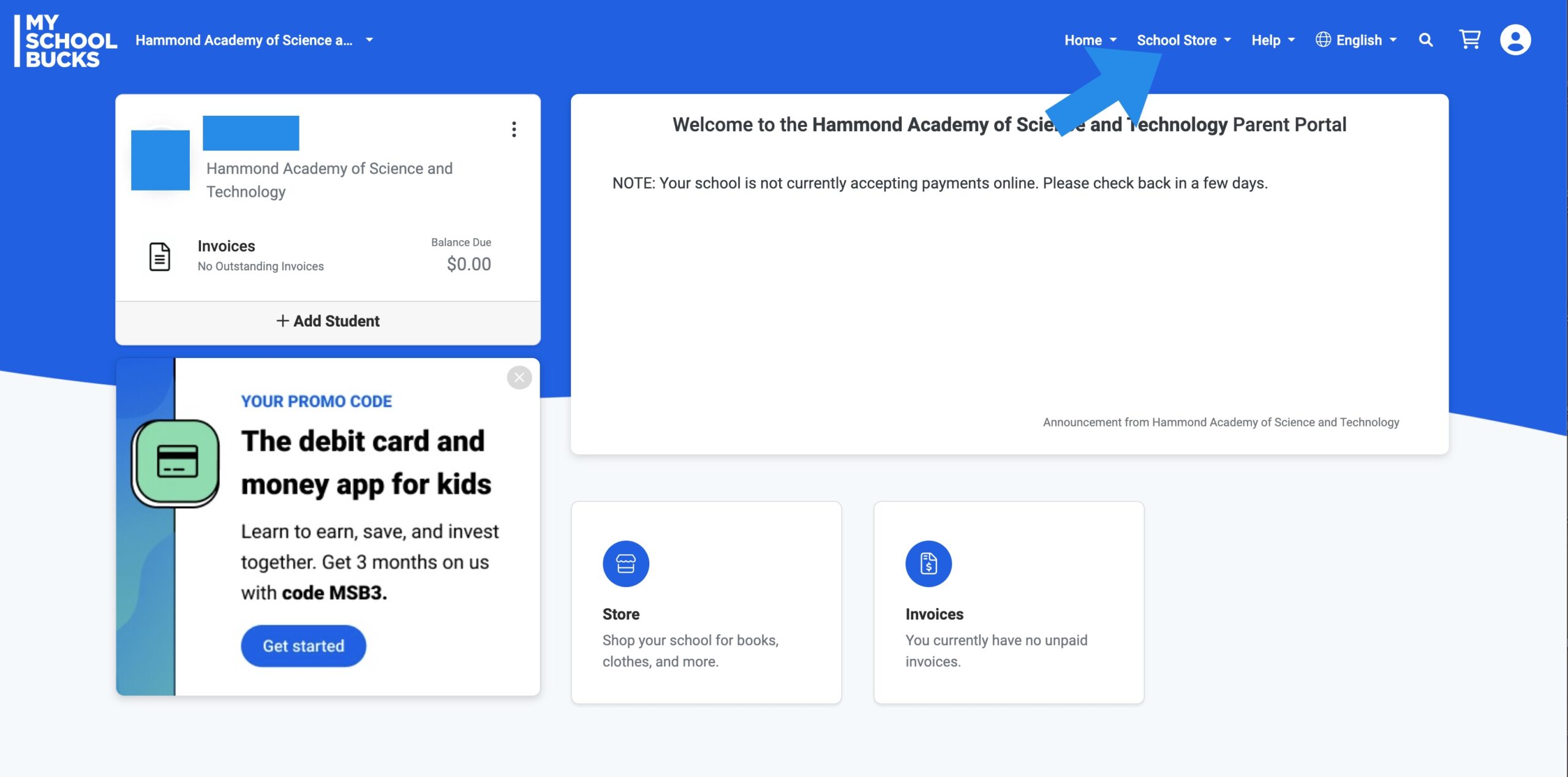
5. Click School Store at the top of the page
6. Select Technology

7. Select the item you wish to purchase and add it to your cart

8. Check out
9. Mr. Smith will receive an email notice of purchase and will get the item to your student as soon as possible.
March 22 E- Learning for Network Maintenance
Wednesday, March 22 will be a traditional e learning day (asynchronous) for staff and students. The building will be closed and everyone should work from home. I will be in the building to work on a new configuration for our Firewall. This will set things up for switch upgrades this summer as well as Internet upgrade. We tried to complete this during a school day and it was not successful due to the need to take the network down for an extended period of time. Hopefully having the whole day will make this easier.
Tech Issues
Issue #1 – Phone Server and Switch Installation
The phone issues that started off the new year continued into February when our new switch arrived to replace the failed one. The tech from the phone company was unable to get the new switch to work. There was no reason. They chalked it up to a bad configuration. A little over a week later, one of the senior support techs came out with the switch to try reinstalling. He ran into the same issues as the field tech. While troubleshooting we discovered the phone server itself was not lit up. This meant there was some issue with the phone server and it may have been the reason nothing was connecting. He called their office and had someone set up a new server to match our configurations. He picked up the replacement, installed, and the new switch worked without issue. We waited a couple weeks for our server to be rapaired by warranty and once it was, a field tech came out to install and finally put an end to the phone saga.
Issue #2 – Call Buttons Randomly Going Off
In January and February there were a number of random call buttons going off in the building without anyone pressing the buttons. This happened several times over a two week period and from different classrooms. I reached out to Tri-Electronics, the company that installed the system, to see if a restart would solve the issue or what they recommended with regard to dealing with this weird issue. They informed me they had not seen that happen before and recommended the restart. I restarted the system about two weeks ago and so far we have not had any more issues.
Issue #3 – Some Printer Issues
As has been the case for much of this school year, there continue to be a number of printer issues. This often involves lines printing to the paper over the print jobs. The 6th grade printer had a piece break off after a paper jam. In a majority of these issues I have to call out a Pulse tech to fix the issue per our service agreement. For some of the line issues I have been able to fix through the printer settings by running the laser cleaner. In November we should be getting new printers and hopefully that will alleviate the issues we have experienced with the Kyocera printers.
New Stuff
There are a number of new things that will be coming next school year with regards to tech.
New iPads & New Cases
New iPads have been ordered for next year. We are getting the 9th generation iPad to replace our 7th generation iPads. We are also going to upgrade our cases to the Logitech Rugged Keyboard cases. Students have asked for keyboard cases the last few years and based upon my research, they are very durable and hold up well with use. I am excited to be able to provide these new cases for students next school year.
Increased Internet Speed
As I mentioned in the January Tech Report, we are increasing our Internet Speed and bandwidth from 700 Mbps to 3 Gbps. This is a much needed increase as we are currently maximizing our 700 Mbps on a regular basis. The 3 Gbps will give us some room as we continue growing.
New Switches
In order to accommodate our Internet Speed upgrade, we have purchased and will install new Extreme Networks switches capable of 2.5 Gb speeds so we can maximize the amount of speed we deliver throughout the building.
New Network Cable Runs
To take advantage of our 2.5 Gb speeds from the new switches, we are installing new CAT 6a cables to all of our access points. This allows for higher speeds at longer distances with less interference.
New Caching Server
In order to increase speeds of downloads, we will be adding a new Mac Mini with a 10gb connection to our network. This should really help with iPad rollout when students are all trying to connect to the app store to download apps.
New Hallway TV
Earlier in the school year one of the hallway TVs broke. On top of that, the program I utilized to display announcements does not allow me to do so any longer without paying a large fee. We will be replacing the broken hallway TV as well as getting a new program to display announcements.
Air Parrot for Each Pod
We are purchasing Air Parrot for each pod so teachers can connect a single Sharp Board to all the Apple TVs in the rooms. This can be used for presenting information to an entire pod, for staff PDs, for parent presentations, etc. This should be a nice tool for staff to have in the classrooms.
Support Ticket Breakdown

Lost iPads

Broken iPads

Reminders
- Make sure you are using a 12w charging block with an Apple Certified cable to charge iPads. iPhone chargers should NOT be used.
- Make sure iPads are charged 100% for spring testing.
- Fill out a support ticket for all tech issues.
- Be on the lookout for end of year procedures such as Tech Audit and iPad Collection.